Avelsta guide
Everything you need to analyse your sailing with Avelsta: import your NKE logs, find and replay your sessions, generate and edit your speed polars, organise your sails. Each page starts with the essentials (the steps and a screenshot), then goes further for the details.
Getting started 5 guides
Discover Avelsta, try it without an account with your logs or a sample sailing session, create an account and find your way around the app.
- What is Avelsta?BeginnerAvelsta analyses your NKE sailing logs: sessions split automatically, replay on the map, statistics, polar percentage and boat speed polars generated from your own data.
- Try Avelsta without an accountBeginnerUpload your NKE logs without creating an account: replay and generated polar in a few minutes. Trial duration (6 hours), limits, and how to keep your sessions by creating an account.
- Explore the example sessionBeginnerDiscover Avelsta without your own logs with a real 23-hour example session, read-only, compared with its boat’s polar.
- Create an account and sign inBeginnerCreate a free Avelsta account with Google, terms of use, first boat created automatically and transfer of your trial without an account.
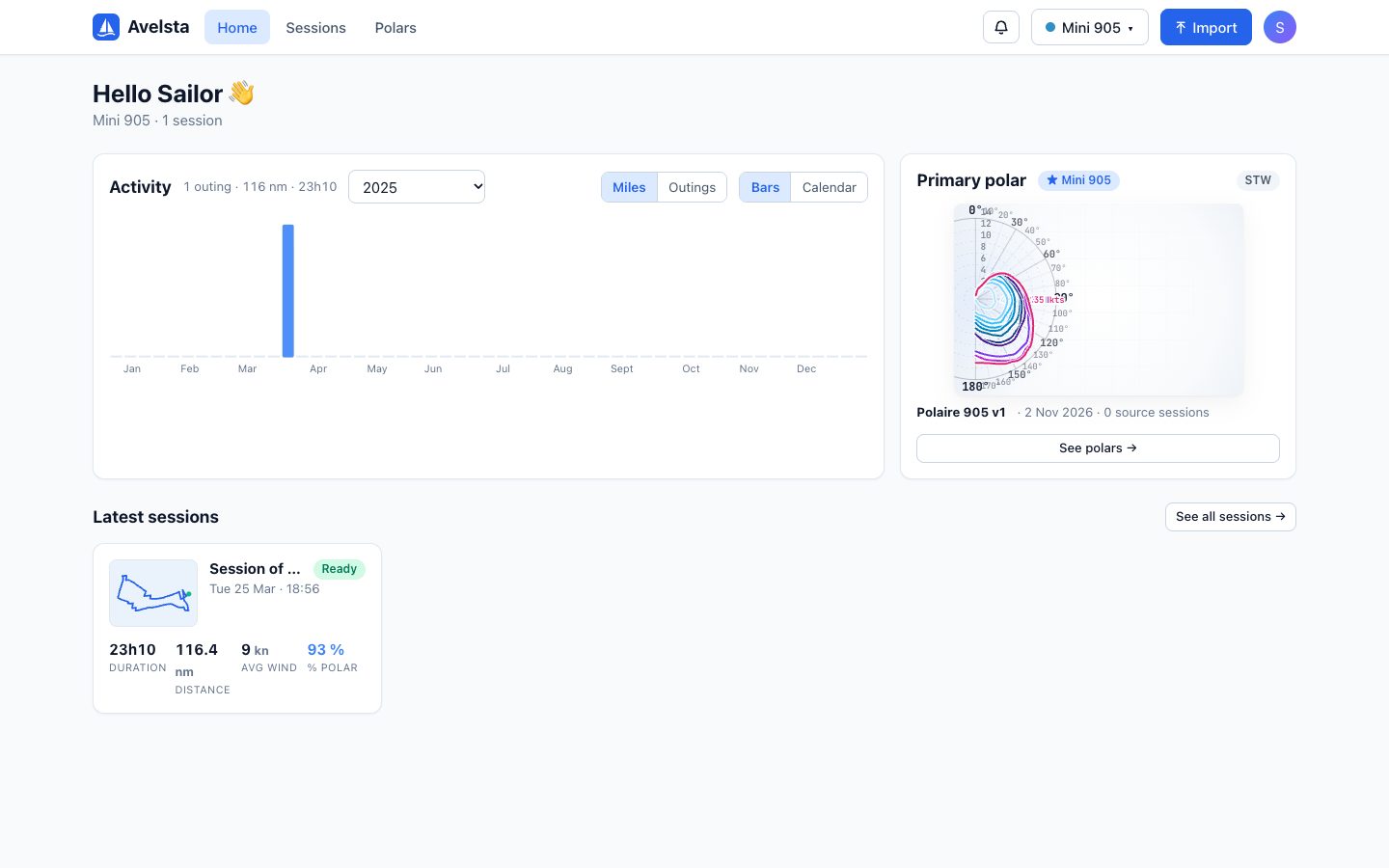
- The home screen and navigationBeginnerFind your way around the Avelsta signed-in space: home screen, 12-month activity, primary polar, latest sessions, boat selector and Import button.
Importing logs 6 guides
Supported NKE log formats, importing .LOG and .nkz files, tracking the processing, import report and import errors.
- Read a .nkz file (NKE Processor HR) onlineBeginnerHow to open a .nkz file recorded by the NKE Processor HR: drop it into Avelsta, with no software or conversion, and read the track, speed, wind, angle and polar.
- Read NKE datalogger .LOG files (Box USB Datalog WiFi)BeginnerHow to open the .LOG files (NMEA 0183) of the NKE Box USB Datalog WiFi datalogger: drop them into Avelsta, with no software, and get the track, curves, replay and polar.
- Supported log formats (NKE .LOG and .nkz)BeginnerAvelsta accepts .nkz files from the NKE Processor HR and .LOG files (NMEA 0183) from the NKE Box USB Datalog WiFi datalogger. Data read and special cases.
- Import your sailing logsBeginnerImport NKE logs (.LOG, .nkz) into Avelsta step by step: choose the boat, drop several files, upload, background processing and end-of-import notification.
- Track an import and read its reportBeginnerThe My imports page in Avelsta: upload history, state of each file, report (sessions created, duplicates, failures), retrying failures and dating a log without a date.
- Import errors: causes and fixesAdvancedWhat to do when Avelsta rejects an NKE log: unrecognised format, corrupted file, no NMEA sentence, no usable measurement, incomplete upload, log without a date.
Sessions and replay 7 guides
Find your sailing sessions, replay them on the map, read the timeline (speed, wind, angle, VMG, polar %), add segments and checkpoints, split, merge and export.
- How sessions are builtAdvancedHow Avelsta automatically splits your logs into sailing sessions: 1 Hz timeline, time at the dock, GPS jumps, split after a 30-minute stop, updates and merges.
- Find your sessionsBeginnerThe Avelsta session list: cards or table view, filters by boat, period and status, search by name, statistics of each sailing session.
- Analyse a session: map, timeline and replayBeginnerOpen a session in Avelsta, read the track on the map, hover over the timeline, start the replay, zoom, compare with the polar and read the instant values.
- Timeline measures (STW, SOG, TWS, TWA, VMG, polar %…)BeginnerMeaning of each curve of the Avelsta timeline: speed through water and over ground, true wind, wind angle and direction, VMG, polar percentage, heel, pitch and current.
- Segments, checkpoints and log notesAdvancedIsolate a leg or a manoeuvre in an Avelsta session: create a segment with SEG mode, read its averages, minimums and maximums, compare segments, add checkpoints and notes.
- Exclude a range, split and merge sessionsAdvancedCorrect Avelsta’s automatic splitting: exclude a range from the statistics with CUT mode, split a session in two, merge two sessions of the same boat.
- Export as GPX, download the logs, delete a sessionBeginnerExport the track of an Avelsta session in GPX format, find and download the original log files, delete a session for good.
Speed polars 6 guides
Understand a polar and the polar percentage, generate your polar from your logs, import a .pol file, edit the polar and choose the primary polar.
- What is a boat speed polar?BeginnerA sailboat’s speed polar gives the target speed for each true wind angle and true wind speed (TWA, TWS). Reading the diagram and the table, theoretical polar and measured polar.
- Polar percentage (POL)BeginnerThe polar percentage compares the boat speed with its target speed at the same angle and wind. Computation, primary polar, recomputing sessions and interpretation.
- Generate a polar from your sessionsBeginnerCompute your sailboat’s measured polar from your NKE logs: choice of sessions, STW or SOG, measured cells, completion with similar reference polars, saving.
- Import a polar (.pol, .csv, .txt) or start from a referenceBeginnerAdd a polar to Avelsta from a .pol, .csv or .txt file, from the library of more than 510 reference polars, or by copying one of your polars. Accepted file format.
- Edit a polar and choose the primary polarAdvancedEdit a polar in Avelsta: drag the diagram points, correct the table, add angles or wind speeds, apply a percentage, overlay your sessions, save a version, set the primary polar.
- Free polar generator, no account neededBeginnerCompute your sailboat’s polar for free from your NKE logs, without creating an account: upload the files, choose the sessions, STW or SOG, polar completed from references.
Boats and sails 4 guides
Create your boats, describe your sails and their configurations, build the sailmap and compare the sails carried with the planned ones.
- Create and manage your boatsBeginnerAdd a boat in Avelsta, fill in its details (builder, length, displacement…), choose the main boat, filter the app on a boat, view its statistics.
- Sails and configurations (Saildeck, Sailset)AdvancedDescribe a boat’s sails in Avelsta: headsails and mainsails, abbreviations, reefs, then sail combinations (configurations) used by the sailmap and the sessions.
- The sailmap: which sails for which windAdvancedBuild your sailboat’s sailmap in Avelsta: angle × wind speed grid, sail configuration per cell, painting tools, observed layer from your sessions, import and export to a spreadsheet.
- Sail configurations on a sessionAdvancedRecord the sails carried during a sailing session in Avelsta: SAIL row of the timeline, pre-filling from the sailmap, agreement with the plan, analysis per configuration.
Account and data 3 guides
Profile, language, theme, security, notifications, retention and deletion of your data.
- Profile, language, theme and securityBeginnerSet up your Avelsta account: display name, French or English language, light or dark theme, units, password change, sign out of every device.
- NotificationsBeginnerAvelsta notifications: end of import and report, failure, polar saved, session split. Where to find them and how they lead to the item concerned.
- Your data: retention, privacy and deletionBeginnerWhat Avelsta keeps (raw logs, sessions, polars), who can see it, for how long, and how to delete a session, a boat, the trial without an account or your whole account.