Profile, language, theme and security
Set up your Avelsta account: display name, French or English language, light or dark theme, units, password change, sign out of every device.
The essentials
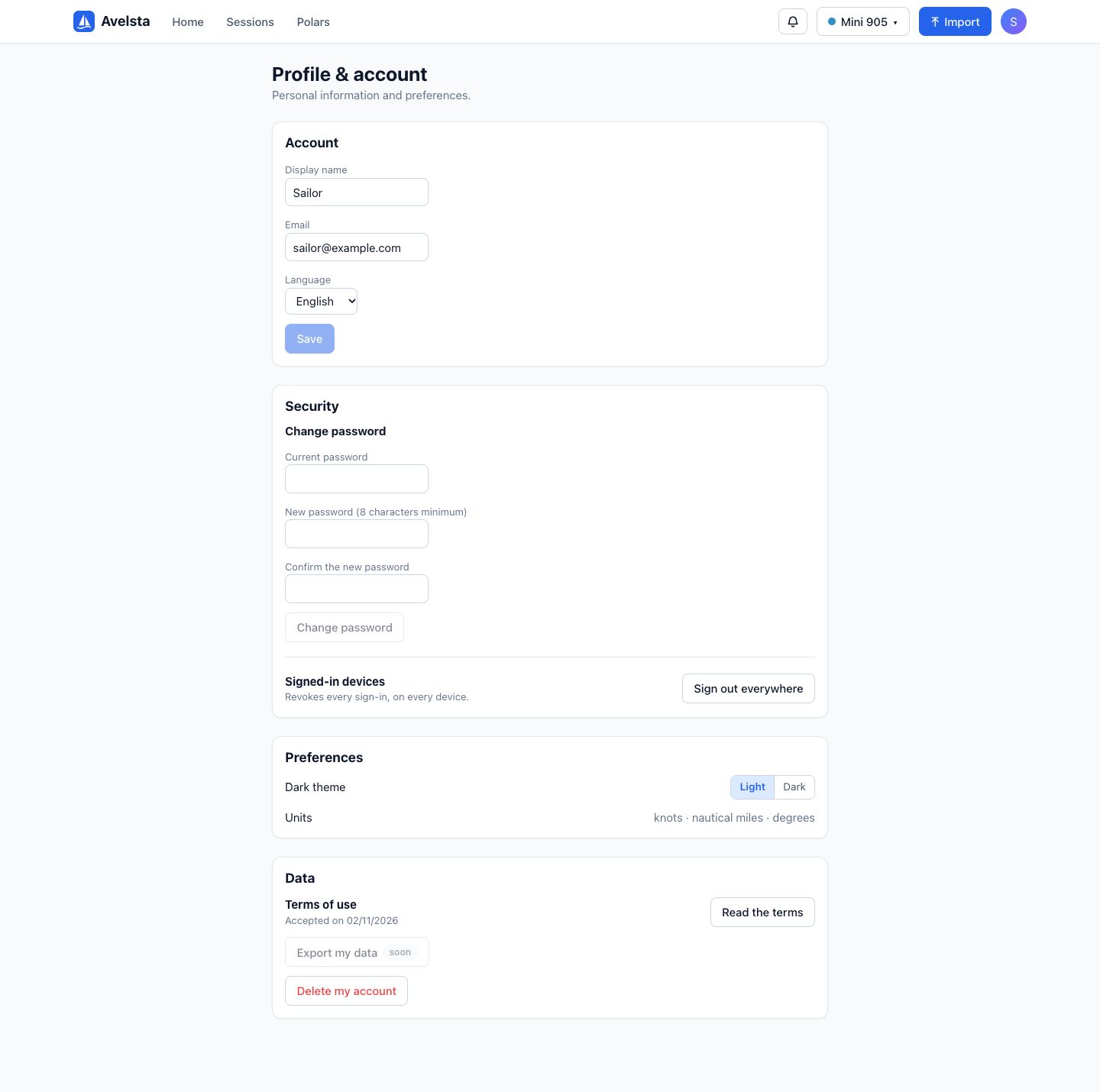
- Open the profile menu (avatar at the top right), then Profile & account.
- Account: change the display name and the language (French or English), then Save.
- Security: Sign out everywhere (and password change for an account that has one).
- Preferences: Light or Dark theme.
Going further
Language
The language chosen applies to the whole interface and to notifications, on all your devices. Without an account, the language is chosen with the FR / EN switch at the top of the page.
Units
Avelsta shows speeds in knots, distances in nautical miles and angles in degrees.
Password
An account created with Google has no password: it signs in through Google. For an account that has a password, enter the current one, then the new one twice (at least 8 characters, with an uppercase letter, a lowercase letter and a digit); after the change, your other devices are signed out.
Sign out everywhere
Revokes every open sign-in, on every device, this one included. Useful after signing in on a shared computer.
Dark theme
The theme is remembered in the browser; it makes reading easier at night or on a tablet in a dark cockpit.
Terms of use
The Data section shows the date you accepted the terms of use and lets you read them again.