Sail configurations on a session
Record the sails carried during a sailing session in Avelsta: SAIL row of the timeline, pre-filling from the sailmap, agreement with the plan, analysis per configuration.
The essentials
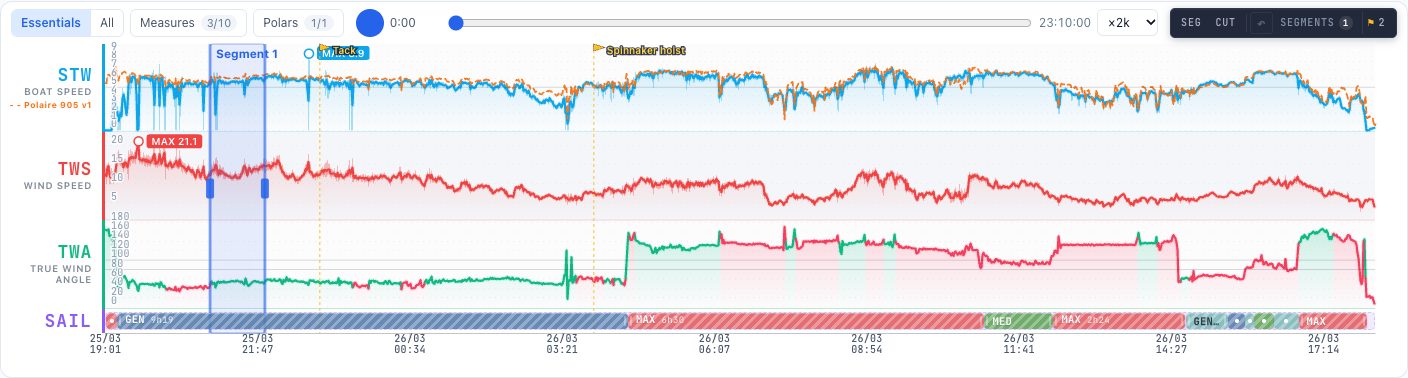
The SAIL row of the timeline shows, for each moment of the session, the sail configuration carried.
- When the session is first built, Avelsta pre-fills the SAIL row from the boat’s primary sailmap (hatched ranges).
- Click a range of the SAIL row to correct it: choose the configuration actually carried, or create one.
- Click an empty area of the row to add a configuration; shorten the start or the end of a range to adjust it.
- The session’s Sailmap tab shows the share of time matching the sailmap.
Going further
Pre-filling
Avelsta smooths the wind angle and speed over 60 seconds, reads the matching cell of the primary sailmap, then only changes configuration if the new one lasts at least 3 minutes: a tack, a gust or a start under spinnaker do not create spurious changes. Pre-filled ranges you have not changed stay hatched; a range edited by hand becomes yours.
Regenerating from the sailmap
After editing the sailmap, the session’s ⋯ menu, Generate from the sailmap: unchanged pre-filled ranges are replaced; those added or edited by hand are kept.
Agreement with the plan
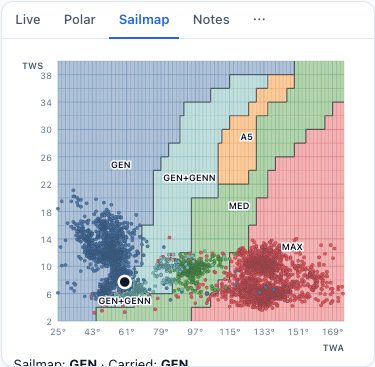
The Sailmap tab shows the configuration planned by the sailmap and the one carried at the hovered moment, the share of time where they match, the number of ranges that differ from the plan and the time spent per configuration.
Building the observed sailmap
The configurations recorded on your sessions feed the Observed layer of the sailmap: over time, Avelsta shows what you actually carry and with which polar percentage.
Without an account
Sail configurations require an account: in the trial without an account and the example session, the SAIL row is read-only.